완성화면

현재 회원가입 되어 있는 구글 아이디로 로그인하는 과정.
DB에 사용자 정보가 저장되어 있지 않을 시 회원가입을 자동으로 진행한다.
오른쪽 상단은 mysql workbench, 오른쪽 하단은 인텔리제이 ide이다.
아직 회원가입되어 있지 않은 구글아이디로 회원가입+로그인을 진행 후 mysql workbench의 user 테이블을 확인하면 새로운 사용자 정보가 DB에 성공적으로 입력되어 있었음을 알 수 있다.
참고 사이트
리액트와 스프링부트를 모두 사용해 본 적이 없어서 로그인 구현부터 난감했다.
구글링을 해서 다양한 솔루션을 따라해보기는 했지만 모두 실패하고 소셜로그인은 포기할까 하던 중 아래 블로그를 발견했다.
https://www.callicoder.com/spring-boot-security-oauth2-social-login-part-1/
Spring Boot OAuth2 Social Login with Google, Facebook, and Github - Part 1
In this article, You'll learn how to add social as well as email and password based login to your spring boot application using Spring Security and Spring Security's OAuth2 client. You'll build a full stack application with Spring Boot and React containing
www.callicoder.com
https://www.callicoder.com/spring-boot-security-oauth2-social-login-part-2/
Spring Boot OAuth2 Social Login with Google, Facebook, and Github - Part 2
Integrate social login with Facebook, Google, and Github in your spring boot application using Spring Security's OAuth2 functionalities. You'll also add email and password based login along with social login.
www.callicoder.com
https://www.callicoder.com/spring-boot-security-oauth2-social-login-part-3/
Spring Boot OAuth2 Social Login with Google, Facebook, and Github - Part 3
Build a full stack application with Spring Boot and React containing social login with Facebook, Google, and Github as well as email and password based login.
www.callicoder.com
(영어로 구글링하다가 발견한 블로그.)
소셜 로그인 과정을 설명해 주고 있어서(1, 2-백엔드, 3-프론트엔드) 진행중인 프로젝트에도 따라 적용해 보았다.
다만 나는 프론트엔드 구현을 진행했기 때문에 백엔드 코드는 깃헙의 프로젝트를 그대로 clone해서 사용하였고, 3번 리액트 파트부터 진행했다.
프론트엔드 구현
위의 코드는 class형 컴포넌트를 사용하는데, 나는 함수형 컴포넌트를 사용하고 있었기 때문에 내 프로젝트에 맞게 모든 코드를 함수형으로 고쳤다. 👉 (https://tinyurl.com/yxq4kmxm) 클래스형 컴포넌트 -> 함수형 컴포넌트 방법은 이 블로그의 글을 참고했다.
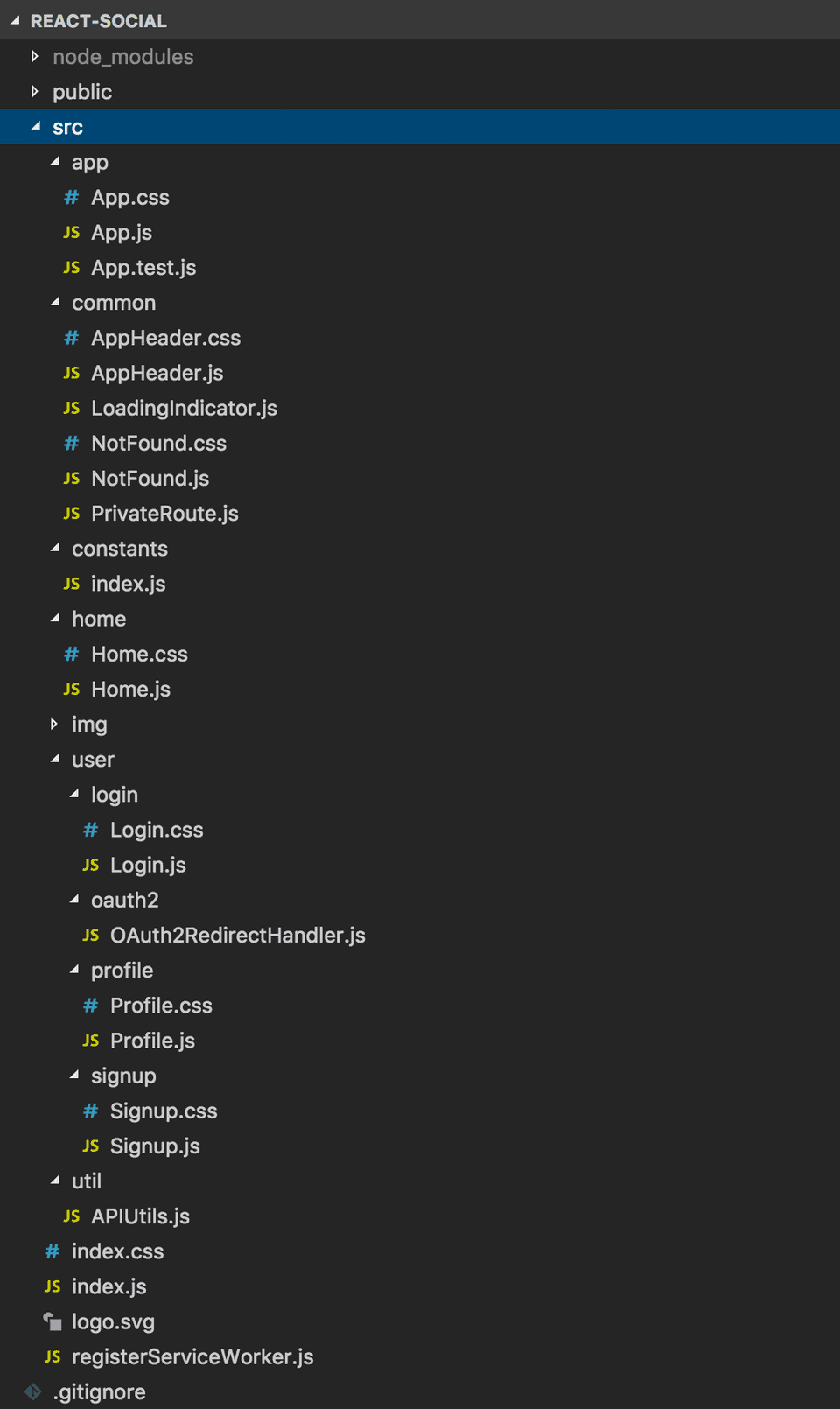
아래 이미지는 위 블로그의 3번 포스팅에서 발췌한 프로젝트 이미지이다. 내가 진행하는 프로젝트와 폴더 구성이 다르긴 하지만 참고용으로 가져왔다.
App.jsx
import React from "react";
import  AppRouter  from "./router/Router";

function App() {
  return <AppRouter />;
}

export default App;
리액트 앱 실행 시 바로 App.js를 실행한다.
나는 App.js를 실행하자마자 바로 AppRouter 페이지의 정보를 띄우도록 <AppRouter />를 리턴시켰다.
AppRouter.jsx
모든 이동경로를 이곳에 구현했다.
백엔드에서 현재 인증된 사용자의 세부 정보를 로드하는 코드도 이곳에 작성했다. 능력이 된다면 분리해서 구현하고 싶은데 아직은 오류가 날까 무서워서 분리를 못하겠다.😨
import React, { useEffect, useState } from "react";
...
import LoadingIndicator from "../components/common/LoadingIndicator";
import OAuth2RedirectHandler from "../components/user/oauth2/OAuth2RedirectHandler";
import { getCurrentUser } from "../components/util/APIUtils";
import { ACCESS_TOKEN } from "../components/constants";

function AppRouter() {
  const [loginInfo, setloginInfo] = useState({
    authenticated: false,	//로그인 여부
    currentUser: null,	//로그인 유저
    loading: true,	//로딩o
  });

  useEffect(() => {	//useEffect: 컴포넌트 렌더링 시 특정작업을 실행
    getCurrentUser()
      .then((response) => {
        setloginInfo({
          currentUser: response,
          authenticated: true,	//로그인o
          loading: false,	//로딩x
        });
      })
      .catch((error) => {
        setloginInfo({
          loading: false,
        });
      });
  }, []);

  //로그아웃 함수
  const handleLogout = () => {
    localStorage.removeItem(ACCESS_TOKEN);	//ACCESS_TOKEN을 제거한다.
    setloginInfo({
      authenticated: false,	//로그인x
      currentUser: null,	//로그인 유저를 null로 setting
    });
    if (alert("로그아웃되었습니다.")) {
    }
    document.location.href = "/";	//초기화면으로 이동
  };

  if (loginInfo.loading) {	//loading이 true이면 로딩화면을 보여준다.
    return <LoadingIndicator />;
  }
  return (
    <div>
      <Router>
      	{/*로그인이 되어 있으면 사이드바에 사용자 정보를 set하고, logout 버튼을 활성화시킨다.
        로그인 되어 있지 않을 시 아무런 액션도 실행하지 않는다.*/}
        {loginInfo.authenticated ? <Sidebar userInfo={loginInfo} logoutAction={handleLogout} /> : <></>}
        <Routes>
          <Route exact path="/" element={<LoginPage userInfo={loginInfo} />} />
          <Route path="/main" element={<Dashboard userInfo={loginInfo} />} />
          ...
          <Route path="/oauth2/redirect" element={<OAuth2RedirectHandler />}></Route>
          <Route path="/signup" element={<SignUpPage userInfo={loginInfo} />} />
          <Route path="/login" element={<LoginPage userInfo={loginInfo} />} />
        </Routes>
      </Router>
    </div>
  );
}

export default AppRouter;
APIUtils.jsx
로그인, 회원가입 api를 호출하는 코드이다.
import { API_BASE_URL, ACCESS_TOKEN } from "../constants";

const request = (options) => {
  const headers = new Headers({
    "Content-Type": "application/json",
  });

  if (localStorage.getItem(ACCESS_TOKEN)) {
    headers.append("Authorization", "Bearer " + localStorage.getItem(ACCESS_TOKEN));
  }

  const defaults = { headers: headers };
  options = Object.assign({}, defaults, options);

  return fetch(options.url, options).then((response) =>
    response.json().then((json) => {
      if (!response.ok) {
        return Promise.reject(json);
      }
      return json;
    }),
  );
};

//User Auth
export function getCurrentUser() {
  if (!localStorage.getItem(ACCESS_TOKEN)) {
    return Promise.reject("No access token set.");
  }

  return request({
    url: API_BASE_URL + "/user/me",
    method: "GET",
  });
}

export function login(loginRequest) {
  return request({
    url: API_BASE_URL + "/auth/login",
    method: "POST",
    body: JSON.stringify(loginRequest),
  });
}

export function signup(signupRequest) {
  return request({
    url: API_BASE_URL + "/auth/signup",
    method: "POST",
    body: JSON.stringify(signupRequest),
  });
}
LoginPage.jsx
로그인 화면이다. 화면 UI는 참고한 글의 UI와 흡사하게(거의 똑같음...) 구성했다.
구글, 페이스북, 깃헙 버튼을 누르면 각 소셜 로그인 AUTH_URL로 이동하도록 되어있다.
👇 AUTH_URL은 아래 더보기란에서 확인 가능하다.
index.js
소셜로그인 이동경로를 저장한 파일이다. 백엔드로 서버인증을 보내고 서버인증을 받아와 프론트엔드에 redirect해줄 때 경로가 반드시 필요하다.
//서버로 인증을 요청할 url (서버의 webSecurityConfig의 base uri와 일치해야 한다)
export const API_BASE_URL = 'http://localhost:8080';
export const ACCESS_TOKEN = 'accessToken';

//서버에서 인증을 완료한 후에 프론트엔드로 돌아올 redirect uri (app.oauth2.authorized-redirect-uri와 일치해야 한다)
export const OAUTH2_REDIRECT_URI = 'http://localhost:3000/oauth2/redirect'

export const GOOGLE_AUTH_URL = API_BASE_URL + '/oauth2/authorize/google?redirect_uri=' + OAUTH2_REDIRECT_URI;
export const FACEBOOK_AUTH_URL = API_BASE_URL + '/oauth2/authorize/facebook?redirect_uri=' + OAUTH2_REDIRECT_URI;
export const GITHUB_AUTH_URL = API_BASE_URL + '/oauth2/authorize/github?redirect_uri=' + OAUTH2_REDIRECT_URI;
import React, { useState } from "react";
import styled from "styled-components";
import { useLocation, useNavigate } from "react-router-dom";
import { GOOGLE_AUTH_URL, FACEBOOK_AUTH_URL, GITHUB_AUTH_URL, ACCESS_TOKEN } from "../components/constants";
import { login } from "../components/util/APIUtils";
import { Link, Navigate } from "react-router-dom";
import fbLogo from "../img/fb-logo.png";
import googleLogo from "../img/google-logo.png";
import githubLogo from "../img/github-logo.png";
function LoginPage({ userInfo }) {
let location = useLocation(); //location 객체를 location 변수에 저장
// const history = useNavigate();
// OAuth2 로그인 시 오류가 발생하면 사용자는 오류와 함께 /login 페이지로 이동
// 오류를 표시한 다음 location에서 오류 쿼리 매개 변수를 제거
// const componentDidMount = () => {
// if (location.state && location.state.error) {
// setTimeout(() => {
// alert(location.state.error, {
// timeout: 5000,
// });
// history.replace({
// pathname: location.pathname,
// state: {},
// });
// }, 100);
// }
// };
if (userInfo.authenticated) { //로그인되었다면 main페이지로 이동
return (
<Navigate
to={{
pathname: "/main",
state: { from: location },
}}
/>
);
}
return (
<Section>
<div className="login-container">
<div className="login-content">
<h1 className="login-title">로그인</h1>
<div className="social-login">
<a className="btn btn-block social-btn google" href={GOOGLE_AUTH_URL}>
<img src={googleLogo} alt="Google" /> Log in with Google
</a>
<a className="btn btn-block social-btn facebook" href={FACEBOOK_AUTH_URL}>
<img src={fbLogo} alt="Facebook" /> Log in with Facebook
</a>
<a className="btn btn-block social-btn github" href={GITHUB_AUTH_URL}>
<img src={githubLogo} alt="Github" /> Log in with Github
</a>
</div>
<div className="or-separator">
<span className="or-text">OR</span>
</div>
<LoginForm />
<span className="signup-link">
아직 회원가입하지 않으셨나요? <Link to="/signup">회원가입</Link>
</span>
</div>
</div>
</Section>
);
}
//아래부터는 이메일 로그인 구현. 소셜로그인과 관계x
//이메일 로그인 폼
function LoginForm() {
//const history = useNavigate();
const [userInfo, setUserInfo] = useState({
email: "",
password: "",
});
//입력값 핸들러
const handleInputChange = (event) => {
const { name, value } = event.target;
setUserInfo({
...userInfo,
[name]: value,
});
};
//정보전송 핸들러
const handleSubmit = (event) => {
event.preventDefault();
const loginRequest = Object.assign({}, userInfo);
login(loginRequest)
.then((response) => {
localStorage.setItem(ACCESS_TOKEN, response.accessToken);
alert("로그인 성공!");
window.location.replace("/main");
})
.catch((error) => {
alert((error && error.message) || "아이디와 비밀번호를 다시 확인해주세요.");
});
};
//login 버튼과 이메일로그인 정보 전송 코드
return (
<Section>
<form onSubmit={handleSubmit}>
<div className="form-item">
<input
type="email"
name="email"
className="form-control"
placeholder="Email"
value={userInfo.email}
onChange={handleInputChange}
required
/>
</div>
<div className="form-item">
<input
type="password"
name="password"
className="form-control"
placeholder="Password"
value={userInfo.password}
onChange={handleInputChange}
required
/>
</div>
<div className="form-item">
<button type="submit" className="loginBtn">
Login
</button>
</div>
</form>
</Section>
);
}
export default LoginPage;
...css 생략주석처리한 부분은 참고한 포스팅에는 포함되어 있는데 실제 구현에는 사용되지 않았던 코드다. 필요성을 조금 더 분석해 보기 위해 삭제하지 않고 주석처리만 해두었다. 주석처리한 부분은 없어도 소셜로그인 구현이 가능했다.
OAuth2RedirectHandler.js
사용자가 서버에서 OAuth2 인증을 완료했을 때 로드되는 파일이다.
인증에 성공한 경우 서버는 액세스 토큰을 사용하여 사용자를 이 페이지로 리디렉션한다.
반면 인증에 실패한 경우에는 오류를 반환한다.
import React, { Component } from "react";
import { useLocation, useNavigate } from "react-router-dom";
import { ACCESS_TOKEN } from "../../constants";
import { Navigate } from "react-router-dom";

function OAuth2NavigateHandler() {
  let location = useLocation();
  const getUrlParameter = (name) => {
    name = name.replace(/[\[]/, "\\[").replace(/[\]]/, "\\]");
    var regex = new RegExp("[\\?&]" + name + "=([^&#]*)");

    var results = regex.exec(location.search);
    return results === null ? "" : decodeURIComponent(results[1].replace(/\+/g, " "));
  };

  const token = getUrlParameter("token");
  const error = getUrlParameter("error");

  if (token) {	//인증 성공. 성공적으로 토큰을 받아온 경우
    localStorage.setItem(ACCESS_TOKEN, token);
    return window.location.replace("/main");
  } else {	//인증 실패
    return (
      <Navigate
        to={{
          pathname: "/login",
          state: {
            from: location,
            error: error,
          },
        }}
      />
    );
  }
}

export default OAuth2NavigateHandler;
참고
https://github.com/callicoder/spring-boot-react-oauth2-social-login-demo
GitHub - callicoder/spring-boot-react-oauth2-social-login-demo: Spring Boot React OAuth2 Social Login with Google, Facebook, and
Spring Boot React OAuth2 Social Login with Google, Facebook, and Github - GitHub - callicoder/spring-boot-react-oauth2-social-login-demo: Spring Boot React OAuth2 Social Login with Google, Facebook...
github.com
https://github.com/Yoonyesol/Web-Social-Account-Book.git
GitHub - Yoonyesol/Web-Social-Account-Book: react, node, spring, mysql을 이용한 웹 가계부 프로젝트(진행 중)
react, node, spring, mysql을 이용한 웹 가계부 프로젝트(진행 중). Contribute to Yoonyesol/Web-Social-Account-Book development by creating an account on GitHub.
github.com
'웹 프로젝트 > 👨👨👧👧소셜 가계부' 카테고리의 다른 글
| [React/Node.js/Express/MongoDB] 소셜 가계부 프로젝트 구현 일지: 기존 React + Spring Boot 소셜 로그인 코드 삭제하기 (0) | 2024.01.13 |
|---|---|
| [React/Node.js/Express/MongoDB] 소셜 가계부 프로젝트 구현 일지: 프로젝트 전체 기획 정리 (1) | 2024.01.13 |
| [React / Socket.io] 채팅 구현하기 (0) | 2023.09.13 |
| [React/JavaScript/Nodejs/Express] 채팅 기능을 포함한 가계부 프론트 웹 프로젝트 (0) | 2022.06.27 |
| [React, FrontEnd] 가계부 웹 사이트 프로젝트 일지-3. 달력 페이지 구현 (0) | 2022.05.29 |
| [React, FrontEnd] 가계부 웹 사이트 프로젝트 일지-2. 페이지 간 이동 구현 (a href와 Link to의 차이점) (0) | 2022.04.09 |